Key Takeaways
-
Check the safety key first, since a clip that is not fully seated cuts power instantly and takes seconds to reseat with no tools.
-
A belt that runs fine unloaded but stops when you step on points to tension or lubrication, and both are fixable at home with silicone oil and a quarter turn on the rear roller bolts.
-
Motor overheating trips a thermal cutout typically after 15 or 20 minutes of use, so clear dust from the motor housing and leave clearance around the machine for airflow.
-
Random stops with no pattern usually mean the speed sensor has shifted away from the flywheel magnet, while stuttering and repeated shutdowns suggest worn motor brushes or a failing control board.
-
Every motorized SOLE treadmill we build carries a lifetime warranty on the frame and motor, so the motor is covered for as long as you own the machine.
Most Treadmill Stops Are an Easy Fix
A treadmill that keeps stopping usually has a loose safety key, a slipping belt, a dry deck, an overheating motor, a weak power supply, or a shifted speed sensor, and most of those you can fix in an afternoon. Only worn motor brushes and control board faults need a technician, and they sit at the bottom of the list for a reason.
The symptom tells you where to look, which saves you from working through all seven causes. Stopping the moment you step on is a belt problem, cutting out after 20 minutes is heat, and stopping at random with no pattern is the sensor.
Most of these faults also trace back to maintenance rather than age, so monthly belt checks, regular lubrication, and a clean motor compartment prevent them entirely.
|
Award-Winning Commercial-Grade Treadmills for Your Home
Why Choose SOLE: ✓ Commercial-grade steel frames with up to 4.0 HP motors 30-Day Money-Back Guarantee: Love it or return it, no questions asked. |

What Are the Common Causes of Treadmill Stops?
1. Safety Key Is Loose or Missing
Start here, because it takes a few seconds and needs no tools. The magnetic safety key is a direct cutoff switch, so if it isn't fully seated or shifts mid-workout, it cuts power and the belt coasts to a stop. This sounds almost too simple, but it is a legitimate cause of sudden stops.
How to Fix a Loose Safety Key
Check that the key is firmly inserted and that the port is not damaged or corroded. A key that no longer sits firmly in its port can also lose contact intermittently as the machine vibrates. Keys are inexpensive, so it's worth keeping a spare.
2. Loose or Worn Walking Belt
When belt tension is either too loose or too tight, the motor has to work significantly harder to keep the belt moving at the set speed. A telltale sign of a belt tension problem is a treadmill that runs fine at low speeds or when unloaded but slows or stops as soon as you add your body weight. You might also notice the belt slipping slightly underfoot or feel an inconsistent surface while walking.

A belt at the right tension holds its speed when your full weight lands on it, which is when a slipping belt gives itself away.
How to Fix Belt Tension
Most treadmills use a simple bolt adjustment system at the rear roller. Here's the standard process:
-
Unplug the treadmill completely before making any adjustments.
-
Locate the rear roller adjustment bolts; typically Allen bolts on both sides of the rear end cap.
-
Turn each bolt clockwise by a quarter turn (equal turns on both sides to keep the belt centered).
-
Plug back in and test at a low speed, then walk on the belt to check it no longer slips.
-
Repeat in quarter turns until the slipping stops, and check your manual for the tension your model specifies.
If the belt is visibly cracked, frayed, or glazed on the underside, no amount of tension adjustment will fix it. Replace a worn belt.
3. Motor Overheating
When a treadmill motor gets too hot, a thermal overload switch cuts power to prevent permanent damage. The machine is doing exactly what it's designed to do. The shutdown isn't the problem; the overheating is.
Several reasons can cause a motor to overheat:
-
Dust and debris accumulation around the motor housing restricts airflow.
-
A belt that's too tight forces the motor to work harder than it should.
-
Operating the treadmill in a poorly ventilated room accelerates heat buildup.
In some cases, the motor is simply aging and can no longer sustain output at higher loads.
How to Address Motor Overheating
Start with the simplest fix first: cleaning. Remove the motor cover and use a can of compressed air to blow out accumulated dust from around the motor, drive belt, and flywheel. Keep the sides and the underside of the machine clear so nothing blocks the air inlets while it runs.
4. Not Enough Lubrication
Lack of lubrication between the walking belt and the deck is a maintenance issue that quietly destroys treadmills. Without adequate lubrication, friction between these two surfaces increases dramatically. That friction transfers directly to the motor as additional load, resulting in the same overheating and shutdown cycle described above.
How to Fix Inadequate Lubrication
The correct lubricant for virtually all modern treadmills is 100% silicone oil. Do not use WD-40, petroleum-based oils, or general-purpose lubricants, as these will damage the belt and deck surface over time. To lubricate, always follow the manufacturer's guidelines in the manual, as this can differ from one treadmill to another.
5. Power Supply or Circuit Problems
A treadmill draws significant amperage, especially at startup and higher speeds, and if the supply cannot meet that demand, the machine shuts down. This kind of stop looks identical to a motor or belt problem from the outside.

A damaged cord or a loose plug can cut out under vibration, so the fault comes and goes without any pattern.
How to Diagnose Power Supply Issues
-
Check how it is plugged in. A treadmill should have its own grounded outlet with nothing else drawing on that circuit, since a shared circuit or a long, thin cord drops the voltage reaching the motor.
-
Test the outlet with another device. If nothing else works in it either, the outlet is the problem, not the treadmill.
-
Inspect the power cord for damage or loose connections at either end.
-
Find the reset button near the power input. Many machines have one that trips under electrical stress, so press it firmly and try the treadmill again.
-
Watch your breaker panel. If the breaker keeps tripping, the treadmill needs its own circuit.
6. Faulty Speed Sensor or Reed Switch
If the stops follow no pattern at all, this is worth checking. The reed switch sits near the front roller and reads a magnet on the flywheel as it spins, sending speed data to the control board. If that signal drops out, the board reads it as a fault and shuts the machine down.
How to Check the Reed Switch
Remove the motor cover and find the small sensor mounted close to the rotating magnet. Check it has not shifted out of position, since a sensor sitting too far from the magnet will not read it reliably.
If the position looks right and the problem continues, the switch itself may have failed. Replacements are model-specific parts and among the cheaper repairs on a treadmill.
7. Worn-Out Motor Brushes or Control Board
If you have worked through everything above without success, the problem sits deeper in the drive system. DC treadmill motors use carbon brushes to maintain contact with the commutator, and once they wear down, they make an inconsistent connection that shows up as stuttering, speed drops, and shutdowns.
How to Check Motor Brushes
To check them, remove the motor housing and compare the brush length against the replacement spec for your model. The control board can also fail, especially after a power surge or moisture exposure. This requires professional assessment.
Treadmill Stopping: Causes & Fixes at a Glance
|
Cause |
What You'll Notice |
First Fix to Try |
|
Loose safety key |
Cuts power mid-stride; belt coasts to a stop |
Reseat the key and check the port |
|
Loose or worn belt |
Runs fine unloaded, slows or stops when you step on |
Tighten the rear roller bolts a quarter turn each side |
|
Motor overheating |
Stops after several minutes, usually at higher speeds |
Clear dust from the motor housing and give the machine clearance |
|
Not enough lubrication |
Noisier belt, dragging feel underfoot |
Apply 100% silicone lubricant to the deck |
|
Power supply or circuit |
Cuts out at startup or trips your breaker |
Plug directly into a dedicated grounded outlet |
|
Faulty speed sensor |
Random stops with no pattern |
Check the sensor sits close to the flywheel magnet |
|
Worn motor brushes or control board |
Stuttering, speed drops, repeated shutdowns |
Measure brush length against your manual, then get it assessed |
Choose SOLE for Superior Treadmill Reliability

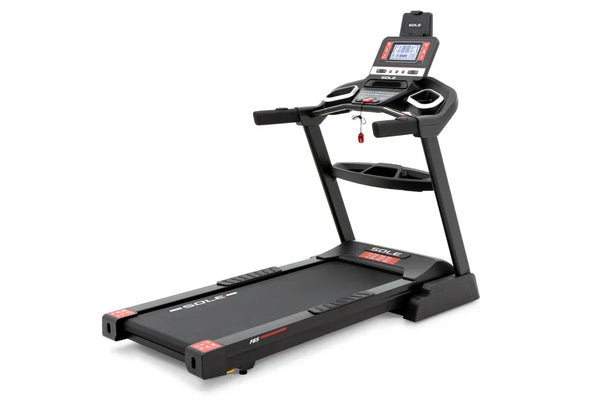
The SOLE F63 runs a 3.0 HP brushless motor, which has no brushes to wear down and cause shutdowns.
Once you have ruled out the easy fixes, a treadmill that keeps cutting out is usually telling you something about the machine. Motors wear, control boards fail, and no amount of troubleshooting reverses that. At that point, the question becomes what you replace it with.
Every motorized treadmill we build carries a lifetime warranty on the frame and motor, so a failed motor is our problem, not something you need to purchase. We have built for hotels and homes for over 25 years, so our treadmills are made for constant use. Shop SOLE treadmills, backed by our 30-day satisfaction guarantee.
Frequently Asked Questions (FAQs)
Why does my treadmill stop when I step on it?
When a treadmill stops as you step on it, the belt slips under the extra load instead of pulling against it. That points to belt tension or lubrication, since both determine how much resistance the motor has to overcome. Check the tension first, then whether the deck is dry.
Can I fix a treadmill that keeps stopping by myself?
Most causes are within reach if you are comfortable with basic tools, including belt tension, lubrication, cleaning the motor compartment, reseating the safety key, and checking the power supply. Call a technician if you smell burning, see damage to the motor or wiring, or the problem persists after working through everything above.
Why does my treadmill stop after 20 minutes?
A treadmill that runs fine for 15 or 20 minutes and then cuts out is showing a thermal overload pattern, where the motor reaches its temperature limit and shuts down to protect itself. Clean the motor compartment, check that the belt is tensioned and lubricated, and give the machine clearance on all sides for airflow. If it continues, the motor may be aging and losing the efficiency that kept it cool.
Is it safe to keep using a treadmill that keeps stopping?
That depends on why it stopped. If you've corrected a loose safety key or a tension issue, it's fine to use once you have tested the fix. If you smell burning, hear unusual noises, or see visible smoke, unplug it and leave it alone until someone inspects it.
Does the SOLE warranty cover a failed motor?
Yes. We cover the motor for life on our motorized treadmills, alongside a lifetime frame warranty. Electronics and parts are covered for up to three years and labor for one year, though coverage lengths vary by model, so check the warranty details for your model. One condition worth knowing is that failing to lubricate the deck at regular intervals may void your warranty, so sticking to the schedule protects your coverage.
*Disclaimer: Products and prices mentioned in this article are accurate as of the date of publication and are subject to change. Please visit the official SOLE website for the most current information.