Key Takeaways
-
Treadmills measure distance by counting complete belt rotations and multiplying by the belt's fixed length, giving real-time distance readings during your session.
-
The distance display typically shows miles or kilometers, depending on your treadmill's unit setting, which you can toggle in the console's settings or preferences menu.
-
Session distance resets with each new workout, while cumulative distance tracks the total mileage your treadmill has recorded over its lifetime and is usually found in the settings or maintenance menu.
-
Accurate distance readings depend on regular belt lubrication, periodic calibration as outlined in your owner’s manual, and monitoring the belt for signs of wear that can affect sensor accuracy.
-
SOLE Fitness treadmills like the F80, F85, F89, and TT8 display distance in real time and work with the free SOLE+ app for automatic session tracking.
Why Does Treadmill Distance Matter for Your Training?
Reading distance on a treadmill turns each workout into a measurable record of your training, something time on the clock alone can’t show. Two 30-minute runs can look identical in a log, yet one might cover 3 miles, and the other 4, and that gap is where real progress shows up.
Distance also anchors the decisions that keep training safe and on track. Race plans for a 5K or half marathon are built around mileage; sudden jumps in weekly volume can signal overtraining before it turns into injury, and the machine’s lifetime mileage tells you when the belt is due for lubrication. Each of those decisions depends on reading the console correctly.
|
Award-Winning Commercial-Grade Treadmills for Your Home
Why Choose SOLE: ✓ Commercial-grade steel frames with up to 4.0 HP motors 30-Day Money-Back Guarantee: Love it or return it, no questions asked. |

How Do Treadmills Measure Distance?

Treadmills provide real-time distance readings by measuring the belt rotations and updating them as you run.
Before you read the display, it helps to understand what it measures. Treadmill distance is calculated with a straightforward formula:
-
Distance = Number of Belt Rotations × Belt Length
The treadmill's internal sensor counts every full rotation the belt makes around the deck. Because the treadmill belt has a fixed, known length, the machine multiplies those rotations by that length to give you your total running distance. It's mechanical, consistent, and surprisingly accurate when the machine is properly maintained.
-
The belt length is fixed for each treadmill model.
-
An internal sensor tracks every complete belt rotation.
-
The console updates distance in real time.
-
Belt wear or stretching can reduce measurement accuracy over time.
-
Calibration resets the system to keep the rotation count accurate.
One thing worth knowing: treadmill distance measures belt movement, not your actual stride. If you hold the handrails or shuffle your feet, the belt keeps moving, and the distance keeps climbing, regardless of your actual effort. Running naturally with proper form gives you the most meaningful data.
How To Read The Distance Display On Your Treadmill

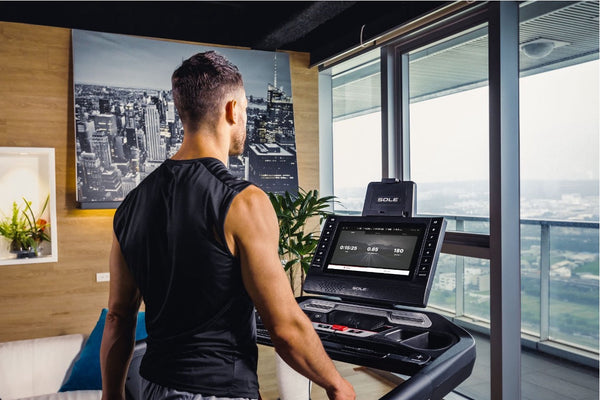
Treadmill consoles often show various metrics, including distance, speed, calories burned, and time.
Most modern treadmill consoles show several metrics at once, including speed, time, calories, heart rate, and distance. It can look overwhelming at first, but distance is almost always one of the most prominently displayed figures. Here's how to read it correctly, step by step.
-
Locate the Distance Metric on Your Console: While the treadmill is running, look at the main display panel. Distance is typically shown in the center or upper portion of the screen, often labeled "DIST" or "Distance." On digital LCD consoles, it's usually part of a rotating display alongside time and calories. On touchscreen models, it's a fixed tile you can often customize or enlarge.
-
Check If Your Treadmill Is Set To Miles Or Kilometers: A reading of 1.00 means you've covered one unit of distance, but that unit can be either 1 mile or 1 kilometer depending on your treadmill's current setting. One mile equals approximately 1.609 kilometers, so misreading this can seriously skew your progress tracking. Check the display for a small "mi" or "km" label next to the distance number before every session.
-
Switch Between Miles & Kilometers in Settings: On most models, you'll find this option in the console's Settings or Preferences menu, accessible from the home screen before you begin a workout. Some treadmills let you toggle units directly from the main console without opening the full settings menu. If you can't find it right away, check your user manual, as the exact path varies by model.
-
Track Cumulative vs. Session Distance: Most treadmills store two distance figures: session distance and cumulative (odometer) distance. Session distance resets every time you start a new workout. Cumulative distance is the total mileage the machine has ever recorded, and it's usually found buried in the settings or maintenance menu.
Setting Up Your Treadmill For Accurate Distance Readings
Calibrate Your Treadmill
Over time, belts stretch slightly, sensors drift, and the numbers on your display start to creep away from reality. Most modern treadmills have a built-in calibration mode accessible through the settings menu. On SOLE Fitness models, your owner’s manual lists the exact menu path for your console.
The process usually involves running the belt at a set speed for a fixed duration while the system recalibrates its rotation count. Check your model’s manual for the exact steps and recommended calibration schedule.
Check Your Belt Condition
A worn or under-lubricated belt doesn't rotate as smoothly, which can cause the sensor to miscount rotations, especially at higher speeds. Follow the lubrication schedule in your SOLE owner’s manual, and check the belt sooner if you notice any of the warning signs below.
You'll know the belt needs attention when you hear squeaking during use, feel unusual vibration underfoot, or notice the belt slipping slightly under load. Replacing a heavily worn belt restores both performance and measurement accuracy in one step.

Tracking your distance on a treadmill helps you gauge how much effort you put into your training routine.
Get Reliable Distance Data With SOLE Fitness Treadmills
Reading distance correctly matters because it is one of the most useful data points in consistent training. Weekly mileage totals, race-prep distances, and month-over-month volume comparisons all depend on the console showing an accurate number. That accuracy depends on belt quality, sensor precision, and how well calibration holds up over hundreds of sessions.
At SOLE Fitness, we build treadmills for years of consistent home training. The F80, F85, F89, and TT8 consoles show distance, speed, incline, calories, and heart rate, and you can switch between miles and kilometers to match your training. Shop SOLE Fitness treadmills today.
Frequently Asked Questions (FAQs)
What does 1.00 distance mean on a treadmill?
A display reading of 1.00 means you've covered exactly one unit of distance, either one mile or one kilometer, depending on your treadmill's current unit setting. Always check whether your console is set to "mi" or "km" before your session, since one mile equals approximately 1.609 kilometers. Misreading the unit is an easy mistake to make, so it’s worth a quick check before you start.
How do I read 1 mile on a treadmill?
To read one mile on your treadmill, check that the unit setting shows "mi" on the distance display, then watch for the distance counter to reach 1.00. If your treadmill is set to kilometers, you'll need to reach 1.61 on the display to have covered the equivalent of one mile. You can change the unit setting through your treadmill’s Settings or Preferences menu. Your owner’s manual shows the exact steps for your model.
Is 2 miles on a treadmill the same as running outside?
Technically, the distance is the same because 2 miles is 2 miles regardless of surface. However, the physical demands differ in a few important ways worth understanding before you compare sessions. Outdoor running requires you to propel yourself forward against air resistance and across varied terrain. On a treadmill, the belt moves beneath you, which slightly reduces the muscular effort required for forward propulsion.
What do the numbers on a treadmill mean?
Speed shows how fast the belt is moving, typically in km/h or mph, and distance shows how far you've traveled in the current session. Time counts up (or down, in programmed workouts) from the moment you start, while incline shows the belt's current angle as a percentage grade. A 1% incline means the deck rises 1 unit for every 100 units of horizontal distance. Calories estimate energy burned, but this figure relies on assumptions about body weight and efficiency that may not reflect your individual metabolism.
How accurate is the distance display on SOLE Fitness treadmills?
SOLE Fitness treadmills track distance in real time and show it on the console alongside other workout metrics. Motorized models like the F80, F85, F89, and TT8 also display speed, incline, calories, and heart rate on a backlit LCD or touchscreen, depending on the model. For the most accurate readings, follow the maintenance and calibration steps in your owner’s manual. SOLE treadmills with Bluetooth connectivity sync with the free SOLE+ app to log your sessions at no additional cost.
*Disclaimer: Products and prices mentioned in this article are accurate as of the date of publication and are subject to change. Please visit the official SOLE website for the most current information.